

How To: Normalize Ventrilo Audio on a Mac
This thread describes how to configure Vent for windows to normalize all incoming audio, effectively making everybody’s voice the same volume to your own ears. Unfortunately, the sound effects features of Vent are not (yet?) implemented for the mac version. I’m a little tired of dealing with either not being able to hear somebody, or getting my ears blown out, so here’s a solution for mac users.Â
Â
You’ll need Garage Band from Apple and some free software called Soundflower. Soundflower is a virtual audio device, and can be used as a conduit of audio between different applications on your mac. Think of it like plumbing. We’ll send the Vent output to the virtual device. Garage Band will be configured to listen to this virtual device and receive audio from it. We’ll use one of Garage Band’s audio plugins – a compressor – to normalize the audio levels received over the virtual device. Throw GB into ‘monitor’ mode, switch back to WoW, and you’re all set.
Â
Here’s the breakdown.
Â
First, download Soundflower here. Install it. Restart.
Â
Next, fire up Garage Band. Make a new empty song file. Open the preferences from the Garage Band menu, click Audio / MIDI, and set the input to Sound Flower 2ch, as shown below.
Â
 Â Â
Â
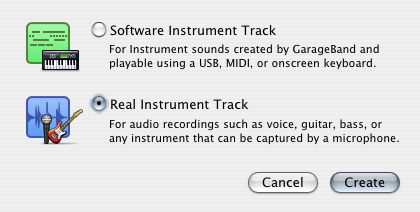
Now make a new ‘real instrument’ track in GB. This will be used to receive audio from Ventrilo by way of the Soundflower virtual audio device.Â
Â
 Â
Â
Now make a new ‘real instrument’ track in GB. This will be used to receive audio from Ventrilo by way of the Soundflower virtual audio device.Â
Â
 Â
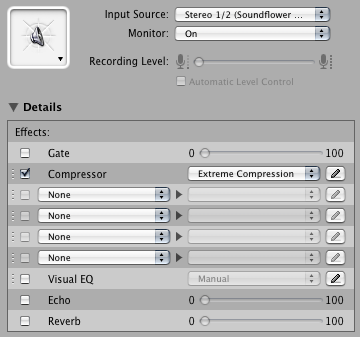
On the right side of the GB window, enable monitor mode (this allows you to hear what’s coming through the input without actually recording). Click the triangle next to “Details” to reveal the audio plugin configuration. Enable the compressor, and choose the ‘extreme compression’ preset.
Â
Â
On the right side of the GB window, enable monitor mode (this allows you to hear what’s coming through the input without actually recording). Click the triangle next to “Details” to reveal the audio plugin configuration. Enable the compressor, and choose the ‘extreme compression’ preset.
Â
 Â
Â
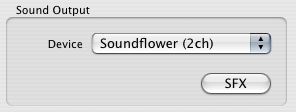
Done with GB, now all that’s left is to configure Vent to send audio to the virtual device. Click Setup in Vent, and set the output to Soundflower 2ch.
Â
Â
Â
Â
Done with GB, now all that’s left is to configure Vent to send audio to the virtual device. Click Setup in Vent, and set the output to Soundflower 2ch.
Â
  Â
That’s it!Â
Â
That’s it!Â
 Â
Â
Now make a new ‘real instrument’ track in GB. This will be used to receive audio from Ventrilo by way of the Soundflower virtual audio device.Â
Â
Â
On the right side of the GB window, enable monitor mode (this allows you to hear what’s coming through the input without actually recording). Click the triangle next to “Details” to reveal the audio plugin configuration. Enable the compressor, and choose the ‘extreme compression’ preset.
Â
Â
Â
Done with GB, now all that’s left is to configure Vent to send audio to the virtual device. Click Setup in Vent, and set the output to Soundflower 2ch.
Â
Â
Â
That’s it!Â